


Rounded Corners Using CSS3
Posted on June 24th, 2010 John Casey
Difficulty: Medium
Estimated completion time: 5 Minutes
Language: CSS3
CSS3 is the currently in development newer version of CSS. In essence the code is the same just with some newer properties and values. Wikipedia describes it as…
CSS3 is modularized and will consist of several separate recommendations
In this tutorial I will tell you how you can easily give elements such as div’s or form inputs rounded corners in just a couple of simple lines of code.
First off we are going to start with a blank HTML5 page like below.
<!DOCTYPE HTML>

<html>

	<head>

		<title></title>

		<style>

		</style>

	</head>

	<body>
</body>
</html>
We are now going to add a div to the page and give it an id of box. Next add some basic CSS styling. Making the body background blue, the div centred, red and 200px by 200px.
<!DOCTYPE HTML>

<html>

	<head>

		<title></title>

		<style>

		body {

			background: blue;

		}

		#box {

			width: 200px;

			height: 200px;

			margin: auto;

			background: red;

		}

		</style>

	</head>

	<body>

		<div id="box"></div>

	</body>

</html>
Now if you view this page in the browser you should have something like the image below.

As you can see the images are currently square. Now to make them rounded we simple add 2 lines of CSS. After our code now looks like this.
<!DOCTYPE HTML>

<html>

	<head>

		<title></title>

		<style>

		body {

			background: blue;

		}

		#box {

			width: 200px;

			height: 200px;

			margin: auto;

			background: red;

			-moz-border-radius: 5px;

			-webkit-border-radius: 5px;

		}

		</style>

	</head>

	<body>

		<div id="box"></div>

	</body>

</html>
You will notice that the 2 lines we have added are very similar, one is aimed at webkit browsers such as Safari and Chrome. The other line is for Mozilla Browsers such as Firefox. The reason they use different properties is because CSS3 has not officially been implemented yet, therefore browsers can have it however they want. Now if we run our code in the browser we should see rounded corners around our div.
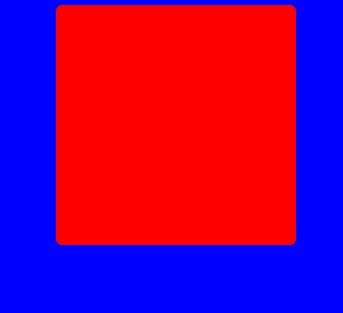
Be aware that this effect will only be visible in browsers that have CSS3 enabled. These include Firefox 3, Google Chrome and Safari.
Filed under CSS |
Comments
-
luis - February 10th, 2015 at 9:35 am
.…
ñïñ!!…
-
Ruben - February 10th, 2015 at 10:13 am
.…
ñïñ çà èíôó….
-
Marc - February 10th, 2015 at 10:49 am
.…
tnx….
-
Robert - February 10th, 2015 at 11:25 am
.…
tnx for info!!…
-
eduardo - February 10th, 2015 at 11:46 am
.…
áëàãîäàðñòâóþ!!…
-
Lee - February 10th, 2015 at 4:18 pm
.…
thanks!!…
-
Rodney - February 10th, 2015 at 7:07 pm
.…
ñïñ!…
-
jeffrey - February 10th, 2015 at 7:46 pm
.…
ñýíêñ çà èíôó!!…
-
Angelo - February 10th, 2015 at 8:25 pm
.…
ñïñ….
-
Mark - February 10th, 2015 at 10:17 pm
.…
ñïàñèáî çà èíôó….
-
isaac - February 11th, 2015 at 3:43 am
.…
tnx!…
-
Jessie - February 11th, 2015 at 4:29 am
.…
thank you….
-
Scott - February 11th, 2015 at 8:19 am
.…
tnx….
-
Jamie - February 11th, 2015 at 9:53 am
.…
thanks for information!…
-
Melvin - February 11th, 2015 at 10:29 am
.…
ñïñ çà èíôó!!…
-
Lewis - February 11th, 2015 at 10:57 am
.…
ñýíêñ çà èíôó….
-
Alfred - February 11th, 2015 at 11:33 am
.…
áëàãîäàðåí!!…
-
Bob - February 11th, 2015 at 12:07 pm
.…
ñïñ çà èíôó!…
-
Gerald - February 11th, 2015 at 12:43 pm
.…
thanks!…
-
Hubert - February 11th, 2015 at 1:19 pm
.…
hello!…
-
Richard - February 11th, 2015 at 1:54 pm
.…
thanks….
-
Bill - February 11th, 2015 at 2:29 pm
.…
tnx!…
-
Alex - February 11th, 2015 at 3:08 pm
.…
tnx for info!!…
-
jeremiah - February 11th, 2015 at 3:46 pm
.…
hello!!…
-
edward - February 11th, 2015 at 4:24 pm
.…
ñïñ çà èíôó!…
-
raul - February 11th, 2015 at 8:09 pm
.…
good info!!…
-
Mario - February 12th, 2015 at 5:32 am
.…
thanks….
-
Armando - February 12th, 2015 at 7:14 am
.…
áëàãîäàðåí!…
-
Louis - February 12th, 2015 at 10:22 am
.…
ñýíêñ çà èíôó!…
-
clyde - February 12th, 2015 at 8:13 pm
.…
ñïñ!…
-
oscar - February 12th, 2015 at 8:52 pm
.…
thanks for information….
-
juan - February 13th, 2015 at 1:45 am
.…
hello!…
-
Ralph - February 13th, 2015 at 4:29 am
.…
hello….
-
Clifford - February 13th, 2015 at 6:43 am
.…
ñýíêñ çà èíôó!!…
-
Jason - February 13th, 2015 at 9:39 am
.…
ñïñ….
-
Orlando - February 13th, 2015 at 10:51 am
.…
ñýíêñ çà èíôó!!…
-
Jason - February 13th, 2015 at 11:17 am
.…
ñïñ çà èíôó!!…
-
stanley - February 13th, 2015 at 11:49 am
.…
áëàãîäàðåí!!…
-
Vincent - February 13th, 2015 at 12:45 pm
.…
ñïñ çà èíôó….
-
Micheal - February 13th, 2015 at 1:14 pm
.…
ñïàñèáî çà èíôó!!…
-
Francis - February 13th, 2015 at 4:37 pm
.…
hello!!…
-
alexander - February 13th, 2015 at 5:10 pm
.…
ñïñ çà èíôó!…
-
norman - February 13th, 2015 at 7:48 pm
.…
thanks for information….
-
Craig - February 14th, 2015 at 12:05 am
.…
ñïñ!…
-
nathaniel - February 14th, 2015 at 4:14 am
.…
good….
-
Perry - February 14th, 2015 at 1:41 pm
.…
áëàãîäàðþ!…